Planner Magic: A Dingbats Font for Creative Projects
In a world saturated with digital noise, the charm of a hand-drawn element can cut through the clutter. Whether you are a small business owner designing packaging, a teacher creating classroom materials, or a content creator looking to add a personal touch to social media graphics, the visual language of your project matters. This is where Planner Magic enters the conversation. It is not just another typeface; it is a specialized dingbats font designed to inject personality, warmth, and a playful aesthetic into a wide variety of creative applications.
Understanding the Visual Language of Planner Magic
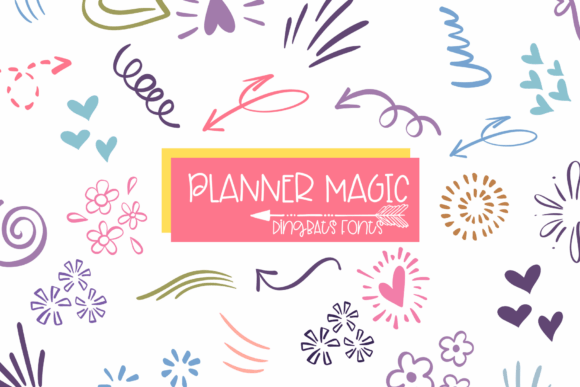
At its core, Planner Magic is a collection of hand-drawn doodle elements. Unlike a standard serif font or sans serif font that carries the weight of body text, a dingbats font functions as a visual toolbox. When you type a letter on your keyboard using this font, a unique icon appears instead. The collection features a curated set of illustrations including arrows, hearts, flowers, sparkles, swirls, and decorative lines.
The defining characteristic of this creative font is its simplicity. The line work is friendly and unpretentious. It avoids the harsh edges of vector perfection in favor of a more organic, human feel. This style makes it incredibly versatile. It does not scream for attention in a way that overwhelms the viewer, but rather complements the existing content. The "magic" lies in its ability to make a digital layout feel tactile, as if it were sketched directly into a physical notebook.
Practical Applications: Where This Font Shines
The utility of a premium font like Planner Magic is defined by its adaptability. While the name suggests a focus on planning, its applications stretch far beyond the margins of a calendar.
- Planners and Bullet Journals: This is the native habitat of the font. For those who love the aesthetic of bullet journaling but lack the time or drawing skill to create consistent icons, this font is a game-changer. It allows users to create uniform headers, checkboxes, and dividers instantly.
- Scrapbooking and Stationery: In editorial design and stationery, consistency is key. Planner Magic provides a cohesive set of graphics for greeting cards, invitations, and scrapbook layouts. Because it is a font, you can resize these elements to massive proportions for posters or shrink them down for stickers without losing quality.
- Small Business Branding: For brands targeting a youthful, crafty, or feminine demographic, these icons can become part of a broader brand identity. They work exceptionally well for packaging design, particularly for handmade goods, bakeries, or boutique retail products.
- Digital Content and Social Media: On platforms like Instagram or Pinterest, visual hierarchy is crucial. Using Planner Magic to create bullet points, section breaks, or decorative accents in your social media graphics helps guide the viewer's eye and breaks up walls of text.
- Print-on-Demand: The icons are perfectly suited for merchandise. They are simple enough to screen print or use with heat transfer vinyl (HTV) on t-shirts, tote bags, and mugs.
Design Strategy: Using Planner Magic Effectively
As a designer or content creator, simply owning a handwritten font or a dingbats set is only the first step. Knowing how to implement it effectively is what separates amateur layouts from professional ones.
Visual Hierarchy and Readability
One of the most common mistakes in modern typography is over-decoration. While Planner Magic is charming, it should be used to support your message, not replace it. Use the icons to create a visual hierarchy. For example, use a floral icon to denote a new section in a blog post, or an arrow to draw attention to a call-to-action. The simplicity of the line art ensures that readability is maintained, provided the icons are spaced correctly.
Font Pairing
The success of a design often relies on font pairing. Because Planner Magic has a distinct, playful personality, it pairs best with typefaces that are clean and structured. Consider pairing it with a geometric sans serif font for a modern look, or a simple serif font for a more traditional editorial feel. Avoid pairing it with overly complex script fonts or other heavy display fonts, as this can create visual clutter. The goal is contrast: let the text be the voice and the icons be the gesture.
Compatibility and Workflow
For those using cutting machines like Cricut or Silhouette, or design software like Canva, workflow integration is vital. Planner Magic is designed to be a standard commercial font file, meaning it installs just like any other typeface on your operating system. Once installed, it appears in your font menu. This allows you to type out your design directly within your software of choice, rather than importing external image files. This streamlines the design process, saving valuable time for busy entrepreneurs and creators.
Evaluating Fit for Your Project
Before integrating Planner Magic into your next project, take a moment to evaluate the context. Ask yourself: Does the tone of this project call for a friendly, human touch? Is the audience likely to appreciate a hand-drawn aesthetic?
This font is an excellent choice for web design elements like blog headers or sidebar icons, provided the site has a lifestyle or creative focus. It is equally effective in logo design for micro-brands, though it is better suited as an accent or secondary mark rather than the primary logo text. For corporate or highly technical fields, a dingbats font might feel out of place, but for lifestyle, education, and retail, it hits the right note.
Ultimately, Planner Magic is a tool for expression. It bridges the gap between digital precision and the organic imperfection of hand-drawn art. By incorporating these doodle elements into your designs, you add a layer of personality that resonates with audiences looking for authenticity. Whether you are printing stickers for an Etsy shop or designing a newsletter for your community, these icons offer a simple, effective way to elevate your visual storytelling.